Moving Compute from AWS to GCP: VMs, Kubernetes and GPUs
One representative estate, moved from AWS to Google Cloud in numbers: which machine family wins on price per request, what an expiring Savings Plan lets you move first, why Spot drain logic breaks at 30 seconds, how big the GKE pod range must be, and what to do with a model compiled for Inferentia.
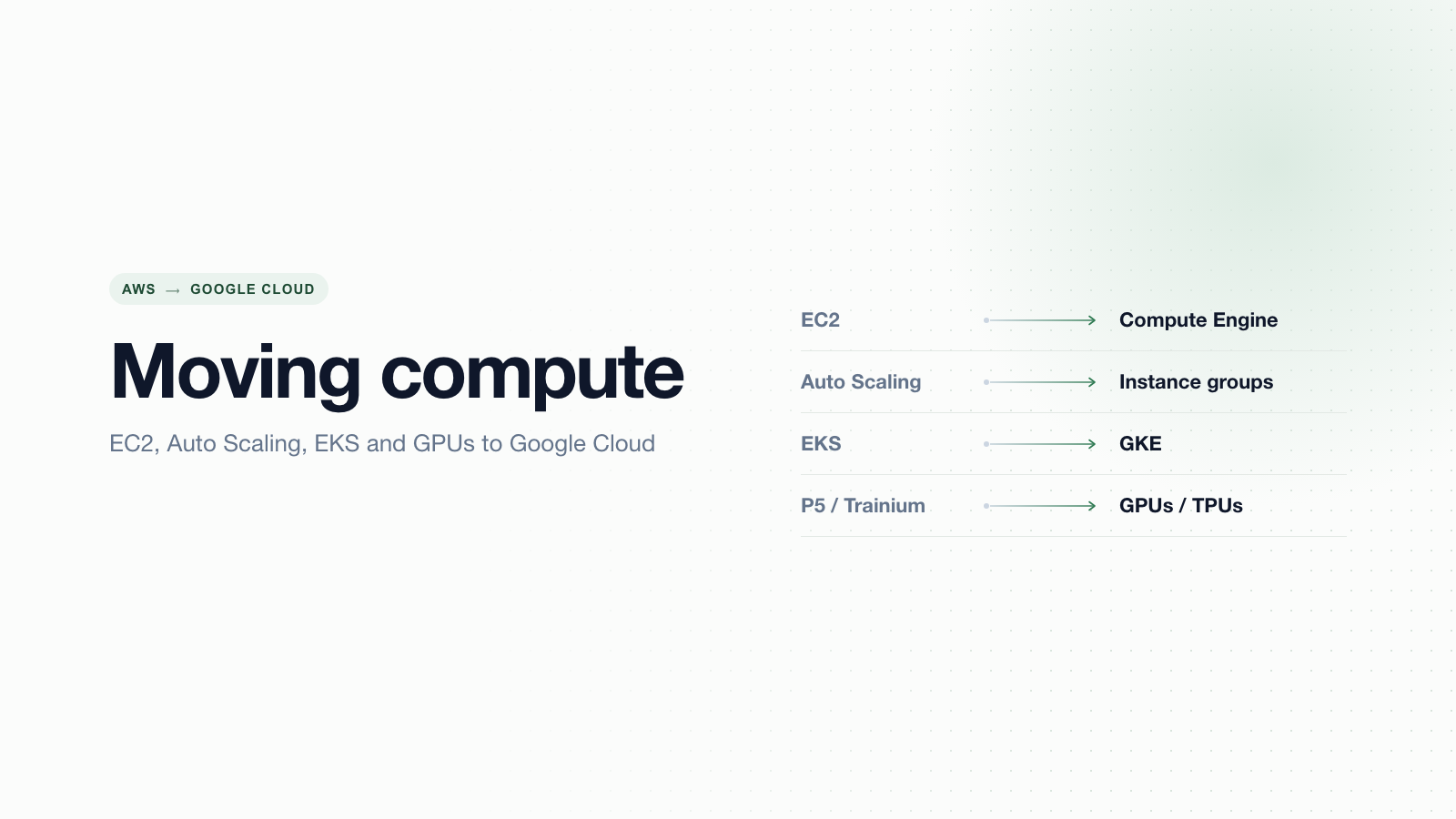
You run 40 c6i.2xlarge instances behind three Auto Scaling groups, a fleet of Spot workers, an EKS cluster with about 1,400 pods and 16 inf2.xlarge machines serving a ranking model. A Compute Savings Plan covers most of it and ends in March. Leadership has signed a Google Cloud commitment. What do you do first?
Not the service map. EC2 to Compute Engine and EKS to GKE takes five minutes to draw. The work that decides whether the move saves money or burns a quarter sits elsewhere: which machine family actually wins once you price your real shapes, what your Savings Plan lets you move and when, whether your Spot drain logic survives a 30-second window, how big the GKE pod range must be before the cluster exists, and what happens to a model compiled for Inferentia.
This post works through those decisions on one representative workload, with list prices, thresholds that flip each decision, the errors you'd hit and the checks we'd run before shifting traffic.
This guide covers compute. For Lambda, Fargate and EventBridge, see moving serverless from AWS to GCP. For EBS, EFS and S3, see moving storage from AWS to GCP. For EMR, Glue and Redshift, see moving big data from AWS to GCP. Going the other way? Read moving compute from GCP to AWS.
The workload we'll move
This is an illustrative workload, not a customer. It's shaped like the estates we see most often, and every number below is an assumption you should replace with your own.
| Tier | On AWS today (us-east-1) | Measured usage | Constraint |
|---|---|---|---|
| API | 3 ASGs, 40 c6i.2xlarge (8 vCPU, 16 GiB) baseline, 64 at peak | p95 CPU 45%, p95 memory 9 GiB | p99 latency SLO of 250 ms |
| Queue workers | 30 Spot instances, mixed c6i and m6i | Jobs take 20 to 70 s; drain handler waits 90 s | Jobs must not be processed twice |
| Kubernetes | EKS prod: 60 m6i.2xlarge nodes via Karpenter, peaks at 140; ~1,400 pods; 35 IRSA roles | Average 23 pods per node, densest nodes 41 | Platform team of three |
| Inference | 16 inf2.xlarge (Neuron-compiled PyTorch ranker), 4 g6.xlarge (L4) for a second model | Steady 24/7 | p99 inference under 40 ms |
| Contracts | Compute Savings Plan, $30/hr commitment, ends in March | GCP commitment already signed |
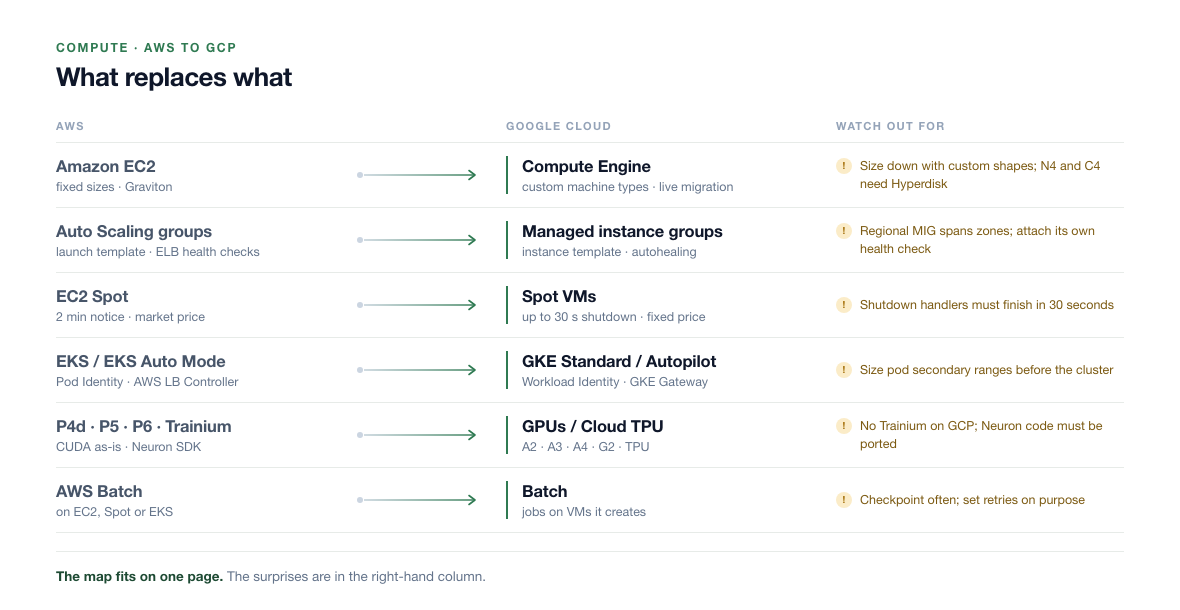
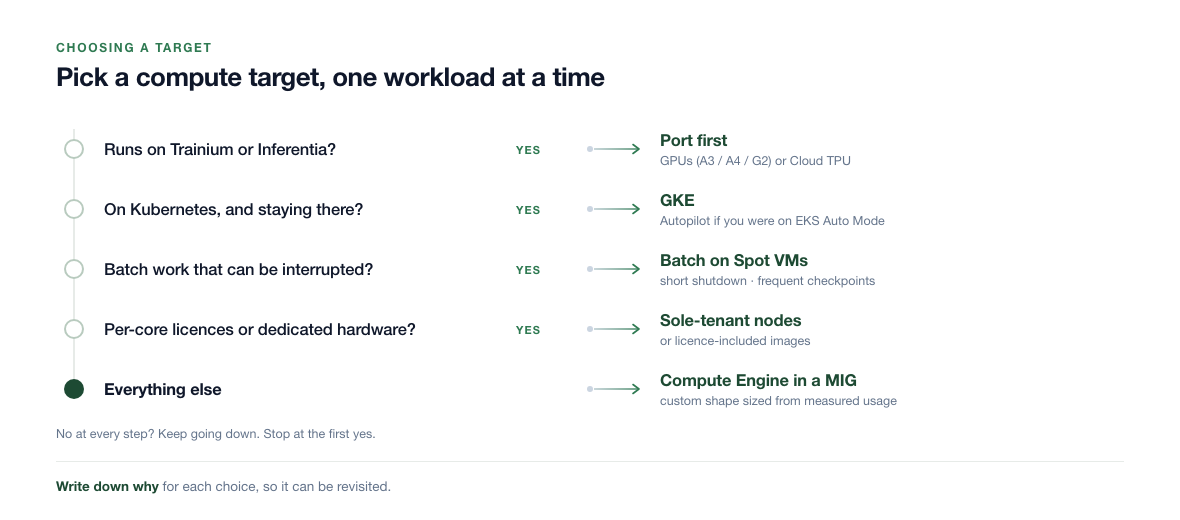
The service map for this estate fits in one figure. Keep it as an index, then spend your time on the decisions below it.
Decision 1: what the Savings Plan lets you move, and when
Savings Plans don't move, and you pay the hourly commitment whether or not anything uses it. A Compute Savings Plan is flexible on the AWS side, though: it applies to EC2 in any family, size or region, and to Fargate and Lambda [17]. So the question isn't "when does the plan end". It's "how much eligible usage can I remove before the commitment is left uncovered".
Pull two numbers from Cost Explorer: the hourly commitment, and the eligible usage per hour priced at Savings Plan rates. With our illustrative fleet at us-east-1 On-Demand list prices (November 2026) [18] and an assumed 25% blended Savings Plan discount:
| Tier | On-Demand $/hr | At SP rates (assumed −25%) | Effect of moving it early |
|---|---|---|---|
| Spot workers | n/a | n/a | None. Savings Plans don't cover Spot, so move these first |
| API (40 × $0.34, plus peak hours averaged in) | ~$17.00 | ~$12.75 | Fits inside the headroom |
EKS prod (60 × m6i.2xlarge at $0.384, plus staging) | ~$26.90 | ~$20.20 | Strands most of the plan |
Inference (16 × inf2.xlarge at $0.7582, 4 × g6.xlarge at $0.8048) | ~$15.35 | ~$11.50 | Strands it, and the port isn't done anyway |
| Total eligible | ~$59.25 | ~$44.45 | Headroom over $30 commitment: ~$14.45/hr |
The API tier ($12.75/hr) fits inside the $14.45/hr headroom, so it can move any time. EKS can't: moving it early leaves roughly $18.50/hr of commitment uncovered, about $13,500 a month at 730 hours, on top of the GKE bill that replaces it. The inference fleet is the best Savings Plan sink you have, because it needs a code port before it can move at all.
Order waves by what each one does to the commitment, not by risk alone. Spot workers and the API tier move first, EKS lands in the last weeks of the plan, and the Inferentia fleet keeps soaking up the commitment while the port is benchmarked.
Decision 2: machine families, priced from measurements
A c6i.2xlarge is 8 vCPUs and 16 GiB. Our API tier uses 45% CPU at p95 and 9 GiB of memory, so we keep 8 vCPUs for latency headroom and size memory to 12 GiB. Here are the candidates in us-central1 at list price as of November 2026 [7]:
| Machine | Shape | On-demand $/hr | 1-yr flexible CUD $/hr | 40 VMs/month on-demand | Notes |
|---|---|---|---|---|---|
AWS c6i.2xlarge (us-east-1) | 8 vCPU, 16 GiB | $0.3400 | n/a | $9,928 | Baseline |
n2d-custom-8-12288 | 8 vCPU, 12 GiB | $0.2775 | $0.1998 | $8,102 | AMD Milan; Persistent Disk or Hyperdisk |
n4-highcpu-8 | 8 vCPU, 16 GiB | $0.3062 | $0.2204 | $8,940 | Intel Emerald Rapids; Hyperdisk only |
c4a-highcpu-8 | 8 vCPU, 16 GiB (Arm) | $0.3030 | $0.2182 | $8,849 | Axion; needs Arm images |
c4-highcpu-8 | 8 vCPU, 16 GiB | $0.3402 | $0.2449 | $9,934 | Highest per-core performance; Hyperdisk only |
n2d-highcpu-8 | 8 vCPU, 8 GiB | $0.2495 | $0.1796 | $7,286 | Rejected: 8 GiB is under our 9 GiB p95 |
List price per VM isn't the decision. Price per request at your SLO is. Divide each price by the requests per second one VM sustains under your p99 target. That gives a clean flip rule against the cheapest option that fits:
- N4 beats N2D only if one
n4-highcpu-8serves at least 10.3% more requests per second than onen2d-custom-8-12288($0.3062 / $0.2775). The ratio is the same under a 1-year flexible CUD. - C4 beats N2D only above 22.6% more throughput per VM.
- C4A (Arm) beats N2D above 9.2% more, but only if every image, native dependency and agent you run ships an arm64 build. If one doesn't, the rebuild cost decides it, not the price.
Run the benchmark with a replay of real traffic, not a synthetic CPU test. Newer cores often clear the 10% bar on request-heavy services, so don't assume the cheapest list price wins.
Two pricing traps in this table
- Sustained use discounts may not apply to you. N2, N2D and C2 earn up to 20% off for a full month of use, and N1 up to 30% [3]. That makes on-demand
n2d-custom-8-12288about $0.2220/hr, close to a 1-year N4 commitment without committing. But Google's docs state that only self-serve (online) Cloud Billing accounts receive sustained use discounts, and usage covered by a CUD doesn't get them either [3]. If your company signed a contract and pays by invoice, check your billing account type before you build a plan on sustained use discounts. - Custom shapes carry a premium. On N4, a custom 8 vCPU / 12 GiB shape costs $0.3066/hr against $0.3062/hr for the predefined 8 vCPU / 16 GiB
n4-highcpu-8[7]. Trimming memory with a custom type saves nothing there. On N2D the same trim does pay, because the next predefined shape up is the 32 GiBn2d-standard-8at $0.3380/hr.
Two hardware details also bite. N4 and C4A don't support Persistent Disk at all, so a template that says pd-balanced on an N4 machine fails to create [8]. And if you pick N2 instead of N2D, custom shapes default to Cascade Lake, an older core than the Ice Lake in a c6i; set min_cpu_platform = "Intel Ice Lake" or your benchmark compares the wrong silicon [8].
Our pick for the scenario: n2d-custom-8-12288, unless N4 clears the 10.3% bar in the replay. That saves about $1,826 a month against the AWS On-Demand baseline before any commitment, and about $4,095 a month once the baseline is covered by a 1-year flexible CUD.
From Auto Scaling group to managed instance group
An Auto Scaling group becomes a regional managed instance group (MIG) built from an instance template, plus an autoscaler. Three differences matter in practice:
- Zones. A regional MIG spreads across zones by itself, because a GCP subnet covers the whole region. You stop listing one subnet per Availability Zone.
- Health checks. On AWS you set
health_check_type = "ELB". On GCP, autohealing uses a health check you attach to the MIG. Give it an initial delay longer than your slowest cold start, or the MIG will recreate VMs that were still booting. - Mixed instance types.
mixed_instances_policybecomes the MIG's instance flexibility setting, which lists several machine types for one regional group.
# AWS: one of the three API groups
resource "aws_autoscaling_group" "api" {
  min_size            = 14
  max_size            = 22
  vpc_zone_identifier = var.private_subnet_ids
  health_check_type   = "ELB"
  launch_template {
    id      = aws_launch_template.api.id
    version = "$Latest"
  }
}

# GCP: the same group as a regional MIG
resource "google_compute_instance_template" "api" {
  machine_type = "n2d-custom-8-12288" # 8 vCPU, 12 GiB: p95 memory was 9 GiB
  disk {
    source_image = var.api_image
    disk_type    = "pd-balanced" # fine on N2D; would fail on N4 or C4A
  }
  # network_interface and service_account blocks go here
}

resource "google_compute_region_instance_group_manager" "api" {
  name               = "api"
  base_instance_name = "api"
  region             = "us-central1" # spreads across zones by itself
  version { instance_template = google_compute_instance_template.api.id }
  auto_healing_policies {
    health_check      = google_compute_health_check.api.id
    initial_delay_sec = 180 # slowest measured cold start was 140 s
  }
}

resource "google_compute_region_autoscaler" "api" {
  name   = "api"
  region = "us-central1"
  target = google_compute_region_instance_group_manager.api.id
  autoscaling_policy {
    min_replicas = 14
    max_replicas = 22
    cpu_utilization { target = 0.6 }
  }
}
Inside the VM, the AWS plumbing changes too:
| On AWS | On GCP | What breaks if you forget |
|---|---|---|
IMDSv2 at 169.254.169.254 | Metadata server at metadata.google.internal (needs the Metadata-Flavor: Google header) | Scripts that read region, instance ID or credentials return 404s |
| Instance profile | Service account attached to the VM | Code falls back to access keys hidden in env files |
| EC2 user data | Startup script in instance metadata | Bootstrap silently doesn't run |
| SSM Session Manager | OS Login plus IAP TCP forwarding | Someone opens port 22 to the internet |
| CloudWatch agent | Ops Agent | Alerts go quiet on cutover day |
| Amazon Linux AMIs | Debian, Ubuntu, RHEL, Rocky or Container-Optimized OS | Amazon Linux doesn't run on Compute Engine; packages differ |
One thing gets better without effort: most Compute Engine VMs live-migrate during host maintenance instead of rebooting. GPU VMs are the exception and still stop, which matters for the inference fleet below.
Decision 3: Spot drain logic for a 30-second window
Our workers drain for 90 seconds: stop pulling, finish the job in hand (up to 70 s), acknowledge it, exit. That logic was built for the EC2 two-minute interruption notice [15]. GCP gives you much less by default.
| EC2 Spot | GCP Spot VMs | |
|---|---|---|
| Warning | Two minutes, best effort [15] | Best-effort shutdown period of up to 30 seconds; a 120-second preemption notice is in Preview [2] |
| On Kubernetes | Node termination handler, then pod grace period | GKE Spot nodes: regular pods get 15 s, then system pods 15 s; extending it needs GKE 1.35 or later, up to 120 s total [9] |
| Early hint | Rebalance recommendation, often before the notice [19] | None |
| Signal | spot/instance-action in metadata, EventBridge event | preempted = TRUE in metadata, ACPI soft-off signal |
| Price | Moves with supply and demand | Can change up to once a day [2] |
A 90-second drain on a 30-second window means every preemption leaves a job half-done and never acknowledged. You have three options:
| Option | What it costs you | Pick it when |
|---|---|---|
| Spot, drain rewritten to under 25 s: stop pulling, release in-flight jobs back to the queue, exit | Jobs must be idempotent; preempted jobs rerun from the start | Jobs are short or checkpointed, and a duplicate is harmless |
| Spot with the 120-second notice | A Preview feature under your production queue | You're testing, not running production |
| On-demand VMs | About twice the Spot price | Jobs are long, not idempotent, and can't be made so cheaply |
The money, for 30 workers on the same 8 vCPU / 12 GiB N2D shape in us-central1 (Spot price on the day we checked; it can change daily) [10]:
- Spot
n2d-custom-8-12288: $0.1406/hr, about $3,078 a month. - On-demand: $0.2775/hr, about $6,076 a month.
- Spot stays cheaper as long as reruns waste less than 49% of worker time (1 − 0.1406 / 0.2775). If you do get sustained use discounts, the bar is 37%.
With jobs under 70 seconds, reruns will never come close to that bar. The cost case for Spot holds easily. The real risk is correctness: a worker that's killed mid-job and redelivered processes the job twice unless it's idempotent. So the work is an idempotency key on every job and a drain that gives the job back instead of finishing it:
# Block until Compute Engine marks this VM preempted, then drain fast.
# Runs as a sidecar process next to the worker.
curl -s -H "Metadata-Flavor: Google" \
  "http://metadata.google.internal/computeMetadata/v1/instance/preempted?wait_for_change=true"

# Returns TRUE on preemption. The worker then has about 25 s to:
#   1. stop pulling new messages
#   2. release in-flight messages (visibility timeout 0 or nack)
#   3. flush metrics and exit 0
kill -TERM "$(cat /run/worker.pid)"
Measure two numbers in the pilot: preemptions per day per zone, and the share of jobs processed more than once (count duplicate idempotency keys). If duplicates show up in downstream tables, the drain isn't releasing messages fast enough.
resource "google_compute_instance_template" "worker" {
  machine_type = "n2d-custom-8-12288"
  scheduling {
    provisioning_model          = "SPOT"
    preemptible                 = true
    automatic_restart           = false
    instance_termination_action = "DELETE" # the MIG recreates it
  }
  # disk, network_interface and service_account blocks go here
}
Decision 4: size the GKE pod range before the cluster exists
Manifests and Helm charts mostly move as they are. The cluster around them doesn't, and the piece you can't fix later is IP space.
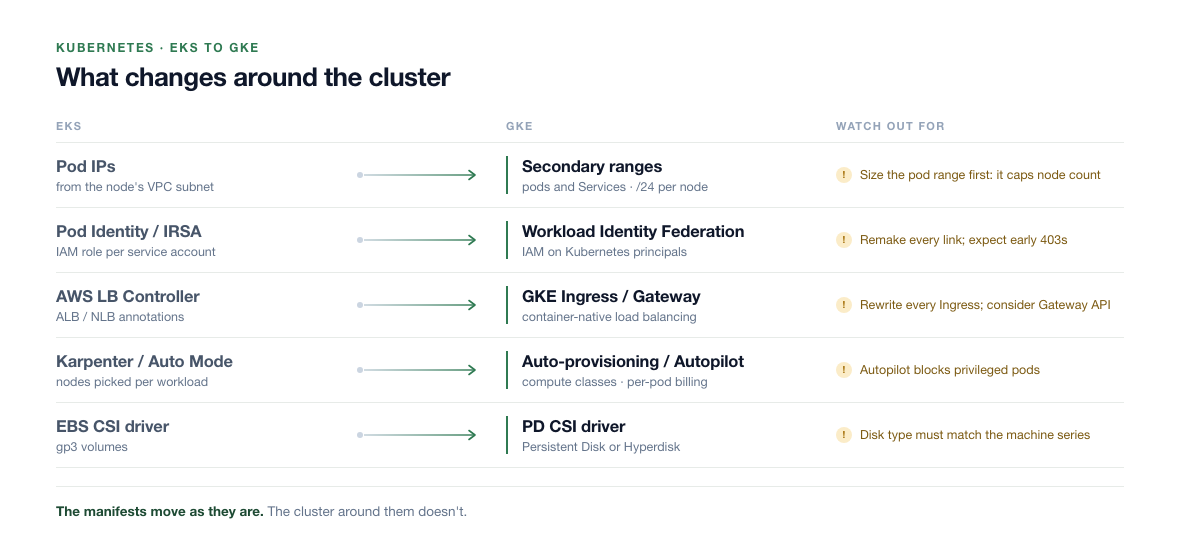
On EKS with the VPC CNI, each pod takes an address from the node subnet, so IP use tracks pod count. GKE works differently. Pods come from a secondary range, and every node reserves a whole block sized from its maximum pods setting, whether it runs 3 pods or 100. At the Standard default of 110 pods per node, that block is a /24 [6]. The pod range size can't be changed after the cluster is created; you can only add more ranges later with discontiguous multi-pod CIDR [6].
Now the math for our prod cluster. Karpenter peaks at 140 nodes. A blue-green node pool upgrade temporarily doubles a pool's nodes [11], so plan for 280. Our densest nodes run 41 pods, DaemonSets included.
| Max pods per node | Block per node | Nodes in a /16 | Nodes in a /17 | Verdict for 280 nodes |
|---|---|---|---|---|
| 110 (default) | /24 (256 IPs) | 256 | 128 | Needs a /15: 131,072 addresses for 1,400 pods |
| 64 | /25 (128 IPs) | 512 | 256 | /16 fits with headroom. Our pick |
| 32 | /26 (64 IPs) | 1,024 | 512 | /17 fits, but our densest nodes already run 41 pods |
Pick ranges that don't overlap the AWS VPC (here 10.0.0.0/16), because during coexistence pods will talk to AWS over the VPN. GKE doesn't masquerade traffic to private ranges by default, so AWS will see pod IPs: the pod range has to be routed over the VPN and allowed in the AWS security groups.
resource "google_compute_subnetwork" "gke_prod" {
  name          = "gke-prod"
  region        = "us-central1"
  network       = google_compute_network.main.id
  ip_cidr_range = "10.80.0.0/22" # nodes: 1,020 usable
  secondary_ip_range {
    range_name    = "pods"
    ip_cidr_range = "10.96.0.0/16" # 512 nodes at /25 each
  }
  secondary_ip_range {
    range_name    = "services"
    ip_cidr_range = "10.81.0.0/20"
  }
}

resource "google_container_cluster" "prod" {
  name                      = "prod"
  location                  = "us-central1"
  network                   = google_compute_network.main.id
  subnetwork                = google_compute_subnetwork.gke_prod.id
  default_max_pods_per_node = 64 # /25 per node instead of /24
  ip_allocation_policy {
    cluster_secondary_range_name  = "pods"
    services_secondary_range_name = "services"
  }
  workload_identity_config {
    workload_pool = "${var.project_id}.svc.id.goog"
  }
  remove_default_node_pool = true
  initial_node_count       = 1
}
If you get this wrong, it shows up as nodes that never arrive and pods stuck in Pending, with this in the logs [12]:
[IP_SPACE_EXHAUSTED] Instance 'gke-prod-pool-1-...' creation failed: IP space of
'projects/acme-prod/regions/us-central1/subnetworks/gke-prod-pods-1a2b3c4d' is exhausted.
Alert on that string in Cloud Logging, and watch pod range allocation in Network Intelligence Center during load tests. Allocation counts every node's full block, not the pods actually running.
IRSA and Pod Identity to Workload Identity Federation
Our 35 IRSA roles each become IAM bindings for a Kubernetes service account. Start with the inventory, because roles hide in annotations and in Pod Identity associations:
# IRSA: service accounts annotated with an IAM role
kubectl get sa -A -o json | jq -r '.items[]
  | select(.metadata.annotations["eks.amazonaws.com/role-arn"])
  | "\(.metadata.namespace)/\(.metadata.name)  \(.metadata.annotations["eks.amazonaws.com/role-arn"])"'

# EKS Pod Identity: associations live outside the cluster
aws eks list-pod-identity-associations --cluster-name prod
On GKE you can grant roles straight to the Kubernetes service account as a principal, with no annotation and no Google service account in between [13]:
gcloud storage buckets add-iam-policy-binding gs://acme-invoices \
  --role=roles/storage.objectViewer \
  --member="principal://iam.googleapis.com/projects/123456789012/locations/global/workloadIdentityPools/acme-prod.svc.id.goog/subject/ns/billing/sa/invoice-worker"
Direct access has per-product limitations. Where a Google API doesn't support it, fall back to linking the Kubernetes service account to an IAM service account with roles/iam.workloadIdentityUser and the iam.gke.io/gcp-service-account annotation [13]. Workload Identity Federation is always on in Autopilot; on Standard you enable it on the cluster, as in the Terraform above.
The failure you'll see in week one is a pod that still needs S3 because the data hasn't moved yet. The AWS SDK finds no credentials on GKE and throws Unable to locate credentials. Plan for it: either keep that workload on EKS until its data moves, or give it an AWS role that trusts Google-issued identity tokens through web identity federation. Don't copy an AWS access key into a Kubernetes Secret as a shortcut; that key outlives the migration.
Nodes, ingress and storage
- Nodes. Karpenter maps to GKE Standard with node auto-provisioning or custom compute classes. EKS Auto Mode maps most closely to Autopilot, but Autopilot bills for the CPU and memory your pods request, not for nodes, and blocks some pod settings such as privileged containers. With a platform team of three and Karpenter today, we'd pick Standard and keep node-level control.
- Ingress. The AWS Load Balancer Controller and its annotations go. GKE's Ingress and Gateway controllers create Google load balancers that send traffic straight to pods. Every Ingress gets rewritten, so it's a good moment to move to the Gateway API.
- Storage. EBS volumes through the EBS CSI driver become Persistent Disk or Hyperdisk through the Compute Engine PD CSI driver. Check that each StorageClass disk type matches the node machine series.
- Fee. GKE charges $0.10 per cluster per hour, with a monthly free-tier credit [5]. Same as EKS standard support.
Decision 5: the Inferentia fleet has nowhere to land
The g6.xlarge machines are the easy part. Same NVIDIA L4, CUDA code unchanged, and g2-standard-4 (1 × L4, 4 vCPU, 16 GiB) lists at $0.7068/hr in us-central1 against $0.8048/hr for g6.xlarge in us-east-1 [18][14], about 12% less.
The 16 inf2.xlarge machines are different. GCP has no Inferentia or Trainium, so a model compiled with the Neuron SDK has to be ported, not moved. Three options:
| Option | Cost per month (16 machines, list) | What it costs you | Pick it when |
|---|---|---|---|
Keep on AWS inf2.xlarge | $8,856 (at $0.7582/hr) | Cross-cloud calls from GCP callers: added latency and data transfer out of AWS | The Savings Plan still has months to run, or the port fails the benchmark |
Port to L4 on g2-standard-4 | $8,256 at 1:1 (at $0.7068/hr) | Engineering time to remove Neuron tracing, fixed-shape bucketing and any custom NKI kernels | One L4 serves at least 93% of one inf2.xlarge throughput at your p99 |
| Port to Cloud TPU | Benchmark first | JAX or PyTorch/XLA rework and per-model testing | The fleet is large enough that a cost gap pays for the rewrite |
The flip point for the L4 port is a throughput ratio, not a price. g2-standard-4 costs 93.2% of inf2.xlarge per hour, so the port breaks even if one L4 sustains at least 93.2% of an Inferentia2 machine's requests per second at the 40 ms p99. If the replay shows 80%, you need 20 L4 machines and the bill rises to about $10,320 a month. GPU VMs on accelerator-optimized machine types don't receive sustained use discounts [3], so price commitments or Spot on top only for the steady base.
For a plain PyTorch model, the port is mostly removing code:
# Before: AWS Inferentia2, compiled for fixed input shapes
import torch_neuronx
model = load_ranker().eval()
neuron_model = torch_neuronx.trace(model, example_inputs)  # one compile per shape bucket
torch.jit.save(neuron_model, "ranker_neuron.pt")

# After: NVIDIA L4, standard PyTorch
model = load_ranker().eval().to("cuda").half()
model = torch.compile(model, mode="max-autotune")
# Drop the shape-bucketing and padding logic in the request path,
# then re-tune batch size: the NeuronCore-optimal batch is rarely the L4-optimal one.
Custom Neuron kernels are a rewrite, and that's where the estimate can blow up. For a 16-machine fleet, a TPU port rarely pays back; revisit it when the accelerator bill is large enough to fund a quarter of engineering. Two operational notes: G2 VMs stop for host maintenance rather than live-migrating, so run them in a MIG or GKE node pool with spare capacity, and GPU quota in a new project starts low, so request L4 quota before the benchmark, not after. For large fixed-period GPU needs, Dynamic Workload Scheduler plays the role EC2 Capacity Blocks for ML play on AWS.
Our call for the scenario: move the g6 machines in the API wave, keep the Inferentia fleet on AWS as a Savings Plan sink, and port it to L4 only after a production replay clears the 93% throughput bar.
The rest of the estate
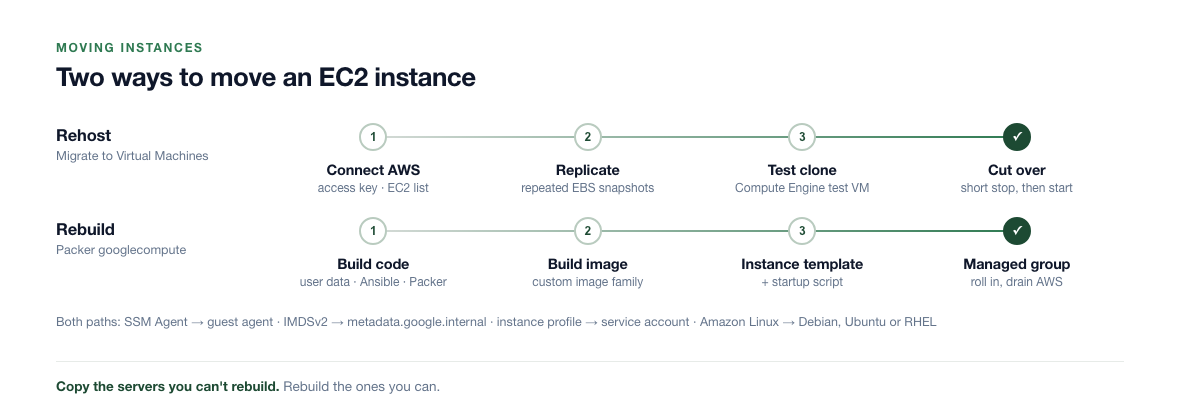
Everything that didn't drive a decision above maps more simply. Rehost servers nobody can rebuild; rebuild everything that's already code.
| AWS | GCP | Decision note |
|---|---|---|
| Hand-built EC2 servers | Migrate to Virtual Machines | Uses your AWS account as a source, replicates EBS volumes, runs a test clone, then cuts over [1]. The service is free; you pay AWS for snapshots, helper instances and data out while it replicates |
| Packer- or Ansible-built AMIs | Custom images via Packer's googlecompute builder, launched by a MIG | More work up front, but rebuildable any time |
| Dedicated Hosts | Sole-tenant nodes | Usually for per-core licences. Price Google's licence-included images first; they often remove the need |
| EC2 bare metal | Bare metal shapes on C3, C4 and X4, or Bare Metal Solution | Bare Metal Solution is for cases like Oracle RAC |
| AWS Batch | Batch on Compute Engine, Spot or standard | Same 30-second Spot rule applies to checkpoints. AWS Batch on EKS fits better as GKE plus Kueue |
| AWS ParallelCluster | Cluster Toolkit | HPC clusters rebuild from blueprints |
| ALB / NLB | External Application or Network Load Balancer | The global Application Load Balancer has one anycast IP, so latency routing in front of it is often unnecessary |
Networking needs its own plan: GCP VPCs are global and subnets are regional, so per-AZ subnets and Transit Gateway meshes collapse. Security groups become firewall rules that target service accounts or secure tags; rewrite them that way rather than by IP range. Cross-zone traffic is still billed per GB on GCP, and Cloud NAT charges per GB like NAT Gateway, so the bill shape doesn't change much.
Cutover and rollback
Before the first wave, pick the region on purpose. Prices above are us-central1. While databases stay in us-east-1, every API call that reaches them crosses the VPN. If that hop pushes your p99 past the SLO, us-east4 in Northern Virginia sits much closer to us-east-1, at higher list prices, so rerun the table with its rates.
- Baseline on AWS. Record two weeks of p50 and p99 latency, 5xx rate, queue age and cost per 1,000 requests for every tier. Without this, there's nothing to compare GCP against.
- Build the base. Projects, Shared VPC with the pod ranges above, HA VPN or Cross-Cloud Interconnect to AWS, quotas for CPUs, L4 GPUs and IPs, Ops Agent and alerts rebuilt from CloudWatch.
- Wave 1: Spot workers. No Savings Plan impact. Run them alongside the AWS workers on the same queue, then scale AWS to zero once the duplicate rate is flat.
- Wave 2: API tier and
g6machines. Lower DNS TTLs to 60 seconds a few days ahead. Shift with weighted records at 5%, 25%, 50% and 100%, holding each step until the gates below pass for a full business day. - Wave 3: EKS. Timed for the last weeks of the Savings Plan. Move namespace by namespace, with identity bindings and ingress verified per namespace.
- Wave 4: inference. Only after the L4 replay passes, or stays on AWS by decision.
- Commit last. Buy flexible CUDs for the measured steady baseline once two or three billing cycles are stable. Spend-based flexible CUDs cover Compute Engine, GKE and Cloud Run [4], so they survive a later family change.
| Metric | Gate to raise the weight | Rollback trigger |
|---|---|---|
| API p99 latency | Within 10% of the AWS baseline | More than 20% over baseline for 15 minutes |
| 5xx rate | No higher than baseline + 0.1 points | Twice the baseline for 5 minutes |
| Queue age (workers) | At or below AWS baseline | Growing for 30 minutes |
| Duplicate job rate | Flat after the Spot pilot | Any rise in downstream duplicate keys |
Pending pods / IP_SPACE_EXHAUSTED | Zero during load test | Any occurrence in prod |
| Cost per 1,000 requests (billing export) | Within 10% of plan | Investigate, don't roll back |
Rollback is only real if the old path is warm. Keep each AWS Auto Scaling group at a reduced minimum, not zero, until GCP has held 100% for two weeks. For the API tier that's 6 c6i.2xlarge, about $1,489 a month at On-Demand list price, which is cheap insurance against a weighted-DNS revert that has nowhere to go. Rolling back is setting the GCP weight to 0; with a 60-second TTL most clients follow within minutes, but some resolvers cache longer, so leave GCP serving until its traffic drains.
Ask AWS about exit fees before the data moves. AWS waives data transfer out to the internet for customers moving all their data off AWS. You contact AWS Support first. AWS's announcement post currently gives customers outside the EU 180 days to finish (earlier versions said 60, then 90), so get the window confirmed in writing for your account [16]. Moving only part of your usage isn't covered by default, so time the request to your final data waves, not your first compute wave.
Where the scenario lands
| Tier | Decision | What flips it |
|---|---|---|
| API | n2d-custom-8-12288 regional MIGs; about $8,102/month on-demand vs $9,928 on AWS, about $5,833 with a 1-year flexible CUD | N4 serving 10.3% more requests per VM, or C4A 9.2% more with arm64 images ready |
| Workers | Spot N2D with a 25-second drain and idempotency keys; about $3,078/month | Jobs that can't be made idempotent |
| EKS | GKE Standard, 64 max pods per node, /16 pod range, direct Workload Identity bindings | Densest nodes passing 64 pods, or the team wanting Autopilot's request-based billing |
GPU (g6) | g2-standard-4, same L4, about 12% lower list price | L4 quota not granted in your region |
| Inferentia | Stay on AWS as a Savings Plan sink, port to L4 after benchmark | L4 below 93% of inf2.xlarge throughput at p99 |
The service map took five minutes. The savings came from four measurements: memory at p95, requests per VM at p99, pods on the densest node and L4 throughput against Inferentia. Take those before anyone picks a machine type.
Common questions
How do I map EC2 instance types to GCP machine types?
Start from measured CPU and memory, not the instance name. Shortlist series by job: E2 for light general use, N2D, N4 or C4A for general purpose, C4 or C3 for compute-heavy, highmem shapes, M3 or X4 for large memory. Then compare price per request at your SLO, and check whether a custom shape is actually cheaper than the next predefined one. On N4 it often isn't.
Does the 2-minute Spot notice exist on GCP?
Not by default. GCP Spot VMs get a best-effort shutdown period of up to 30 seconds, with a 120-second notice option in Preview. On GKE Spot nodes, regular pods get 15 seconds by default. Rewrite drain logic to release work quickly, and make jobs idempotent.
How big should my GKE pod range be?
Multiply your peak node count by two if you'll use blue-green upgrades, then by the block each node reserves: /24 at 110 max pods, /25 at 64, /26 at 32. Size the secondary range to cover that, outside any CIDR your AWS VPCs use. You can't resize the range later, only add more ranges.
What replaces IRSA or EKS Pod Identity on GKE?
Workload Identity Federation for GKE. Grant IAM roles directly to the Kubernetes service account's principal identifier, or link it to an IAM service account where a product doesn't support direct access.
Is there a Trainium or Inferentia equivalent on GCP?
No. Neuron-compiled models have to be ported. Plain PyTorch models usually go back to standard PyTorch on NVIDIA GPUs with modest work; custom Neuron kernels need rewriting. Cloud TPUs can be cheaper at scale but need JAX or PyTorch/XLA and per-model testing.
What replaces AWS Savings Plans on GCP?
Committed use discounts. Resource-based CUDs cover a machine series in a region; spend-based flexible CUDs cover Compute Engine, GKE and Cloud Run. Sustained use discounts apply automatically to N1, N2, N2D and C2, but only on self-serve billing accounts and not on usage a CUD already covers.
How MigrateX handles this
MigrateX is our platform and service for moving software, data and infrastructure from one technology to another. Automation does the repetitive work, and experienced engineers make the decisions this post walks through.
- Assessment. We inventory every instance, Auto Scaling group, EKS cluster, GPU machine and batch job with measured CPU, memory and pod density, plus the hidden ties to AWS: metadata calls, access keys, IRSA roles and Neuron code. We also map Savings Plan coverage, so wave order reflects the commitment.
- Plan. With your team, we price candidate machine families per tier, size pod and service ranges, choose Spot or on-demand per workload and agree the gates for each traffic shift.
- Migration. Automation converts launch templates and Terraform into instance templates, MIGs and GKE configuration, and runs Migrate to Virtual Machines for servers that must be rehosted. Engineers handle identity, networking, Spot drain logic and accelerator ports.
- Proof. Each tier runs on both clouds. We compare latency, error rate and cost per request against the AWS baseline and only raise the traffic weight when the gates pass.
- Handover. AWS is retired group by group, CUDs are bought against measured steady usage, and your team owns infrastructure it understands.
- No big switch-over weekend. Traffic moves by weight, one wave at a time.
- A warm rollback path until GCP has held full traffic.
- Cost decisions made in numbers. Right-sizing, Spot and commitments are part of the plan, not a follow-up.
- The same approach across the stack. Storage, serverless, big data, and front ends like Angular, Ember and jQuery.
Planning a move from AWS to GCP? Tell us about your setup through Contact Us, and we'll start with a free conversation about where the work is likely to be.
References
Google Cloud
- Google Cloud. Migrate to Virtual Machines architecture. https://docs.cloud.google.com/migrate/virtual-machines/docs/5.0/discover/architecture
- Google Cloud. Spot VMs. https://docs.cloud.google.com/compute/docs/instances/spot
- Google Cloud. Sustained use discounts. https://docs.cloud.google.com/compute/docs/sustained-use-discounts
- Google Cloud. Committed use discounts. https://docs.cloud.google.com/docs/cuds
- Google Cloud. GKE pricing. https://cloud.google.com/kubernetes-engine/pricing
- Google Cloud. Configure maximum Pods per node. https://docs.cloud.google.com/kubernetes-engine/docs/how-to/flexible-pod-cidr
- Google Cloud. General-purpose VM pricing (us-central1; list prices as of November 2026). https://cloud.google.com/products/compute/pricing/general-purpose
- Google Cloud. General-purpose machine family (N4 and C4A disk support, N2 CPU platforms). https://docs.cloud.google.com/compute/docs/general-purpose-machines
- Google Cloud. Spot VMs on GKE. https://docs.cloud.google.com/kubernetes-engine/docs/concepts/spot-vms
- Google Cloud. Spot VMs pricing (us-central1; as of November 2026). https://cloud.google.com/spot-vms/pricing
- Google Cloud. Node upgrade strategies. https://docs.cloud.google.com/kubernetes-engine/docs/concepts/node-pool-upgrade-strategies
- Google Cloud. Troubleshoot VPC-native clusters. https://docs.cloud.google.com/kubernetes-engine/docs/troubleshooting/vpc-clusters
- Google Cloud. Authenticate to Google Cloud APIs from GKE workloads. https://docs.cloud.google.com/kubernetes-engine/docs/how-to/workload-identity
- Google Cloud. Accelerator-optimized VM pricing (us-central1; as of November 2026). https://cloud.google.com/products/compute/pricing/accelerator-optimized
AWS
- AWS. Spot Instance interruption notices. https://docs.aws.amazon.com/AWSEC2/latest/UserGuide/spot-instance-termination-notices.html
- AWS. Free data transfer out to internet when moving out of AWS. https://aws.amazon.com/blogs/aws/free-data-transfer-out-to-internet-when-moving-out-of-aws/
- AWS. What are Savings Plans? https://docs.aws.amazon.com/savingsplans/latest/userguide/what-is-savings-plans.html
- AWS. Amazon EC2 On-Demand pricing (US East, N. Virginia, Linux; list prices as of November 2026). https://aws.amazon.com/ec2/pricing/on-demand/
- AWS. EC2 instance rebalance recommendations. https://docs.aws.amazon.com/AWSEC2/latest/UserGuide/rebalance-recommendations.html
Further reading
- Google Cloud. Hyperdisk overview. https://docs.cloud.google.com/compute/docs/disks/hyperdisks
- Google Cloud. VPC-native clusters. https://docs.cloud.google.com/kubernetes-engine/docs/concepts/alias-ips
- Google Cloud. Migrating out of AWS just got a lot easier. https://cloud.google.com/blog/products/infrastructure-modernization/migrating-out-of-aws-just-got-a-lot-easier
- AWS. Amazon EKS Auto Mode. https://docs.aws.amazon.com/eks/latest/userguide/automode.html